
Modernizing Global
Trade Finance
Re-architecting the Import Letter of Credit lifecycle from a complex, form-heavy interface to a guided, intelligent workflow—reducing cognitive load and maximizing Straight-Through Processing for global banks.
Project
Trade Innovation NEXT
Role
UX Architect
Focus Module
Import Letter of Credit
Key Outcome
40% Efficiency Gain
Diagnosing Operational Bottlenecks
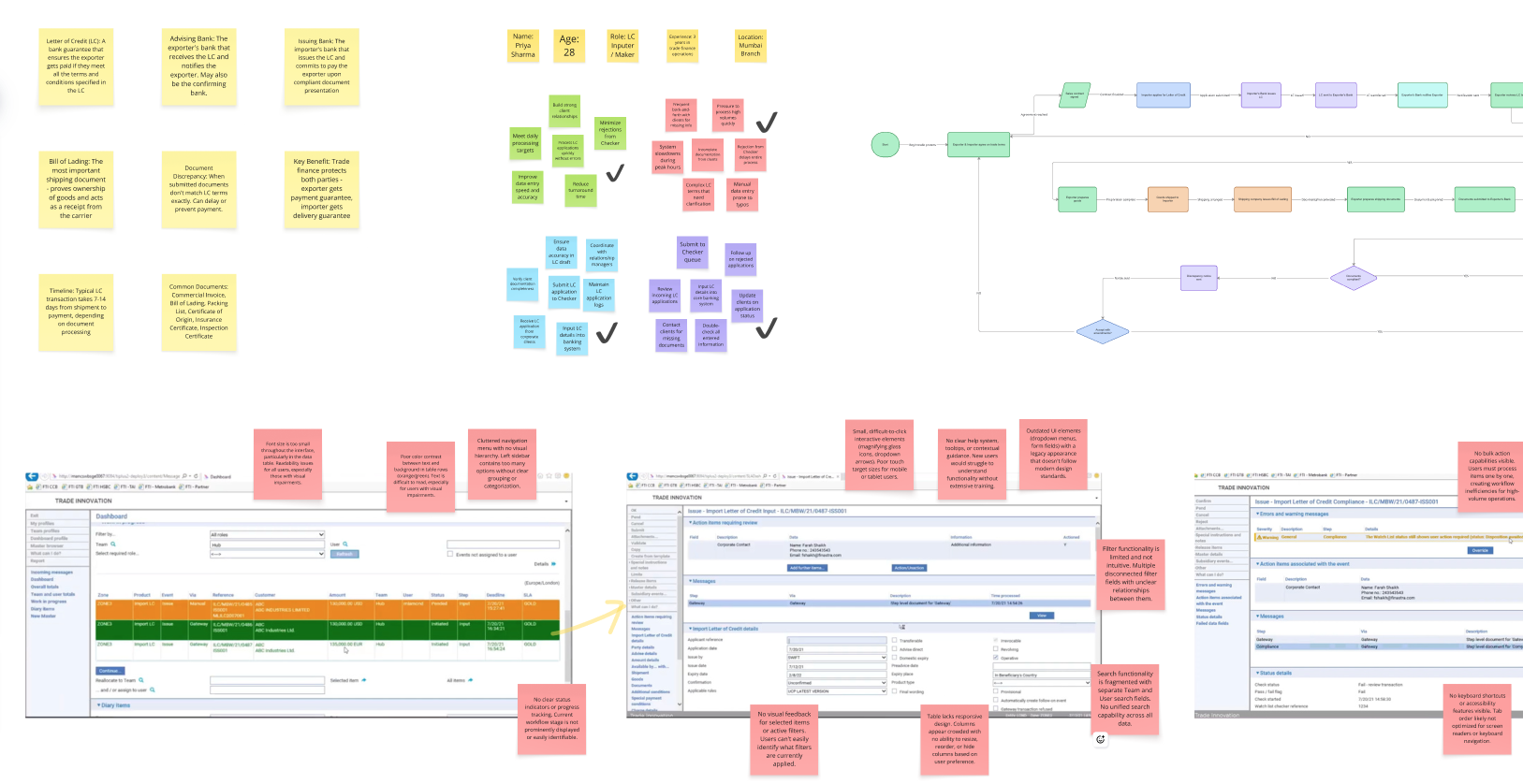
Trade Finance operates under zero-error tolerance and strict SWIFT cut-off times. Yet, the legacy infrastructure forced officers to navigate a high-stress, non-linear environment. My audit revealed that the interface was not just 'hard to use'—it was actively generating operational risk by forcing senior decision-makers to function as data-entry clerks.
Cognitive Overload
Users were forced to process 100+ unstructured fields in a single view, requiring memorization of arbitrary data patterns to complete tasks.
Hidden Risks
Critical validation errors remained invisible until final submission. This 'feedback lag' directly contributed to high rejection rates and delayed transactions.
Systemic Inconsistency
Navigation was unpredictable. Conflicting labels (e.g., 'OK' vs 'Confirm', 'Back' vs 'Exit') increased friction and learning curves.
Governance Gaps
The interface failed WCAG 2.1 (Level AA) compliance and deviated from Finastra’s Design System, creating legal risk and brand erosion.
The Operational Bottleneck
The legacy 'Monolithic Input' pattern forced heavy cognitive load on officers, leading to high manual error rates and operational latency. The lack of immediate validation meant errors were caught too late, jeopardizing SWIFT cut-off compliance.
The Goal
Re-architect the workflow into a context-aware, guided system that enforces data integrity at the source. The goal was to shift from 'Data Entry' to 'Exception Management,' maximizing Straight-Through Processing (STP).
Strategic Architecture
I implemented two structural interventions to enforce data integrity and streamline the operational workflow:
Progressive Disclosure
Deconstructed the monolithic form into logical milestones. By isolating data contexts (e.g., segregating 'Shipment' from 'Payment'), we significantly reduced cognitive load and focused user attention on task completion.
Proactive Error Prevention
Shifted validation logic from 'Post-Submission' to 'Real-Time.' By validating SWIFT syntax at the input source, we ensure Data Integrity before the transaction ever reaches the approval stage.
Rationalizing the Workflow
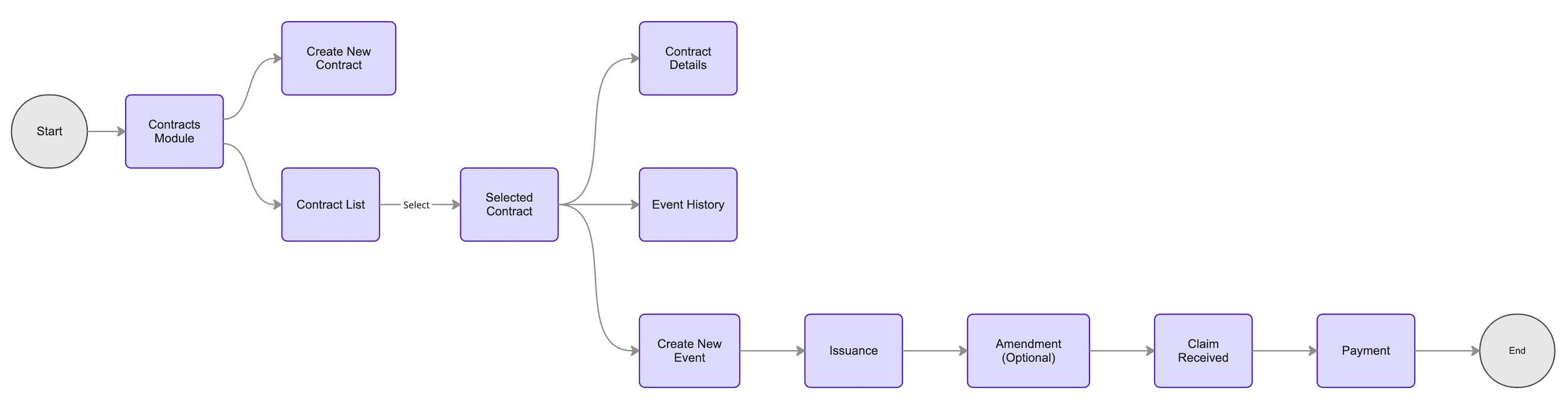
Prior to UI exploration, I audited the legacy dependencies to identify process redundancies. I mapped the end-to-end Import LC lifecycle to decouple complex loops, establishing a linear, STP-optimized path.
The Solution
A. CONTEXTUAL ARCHITECTURE
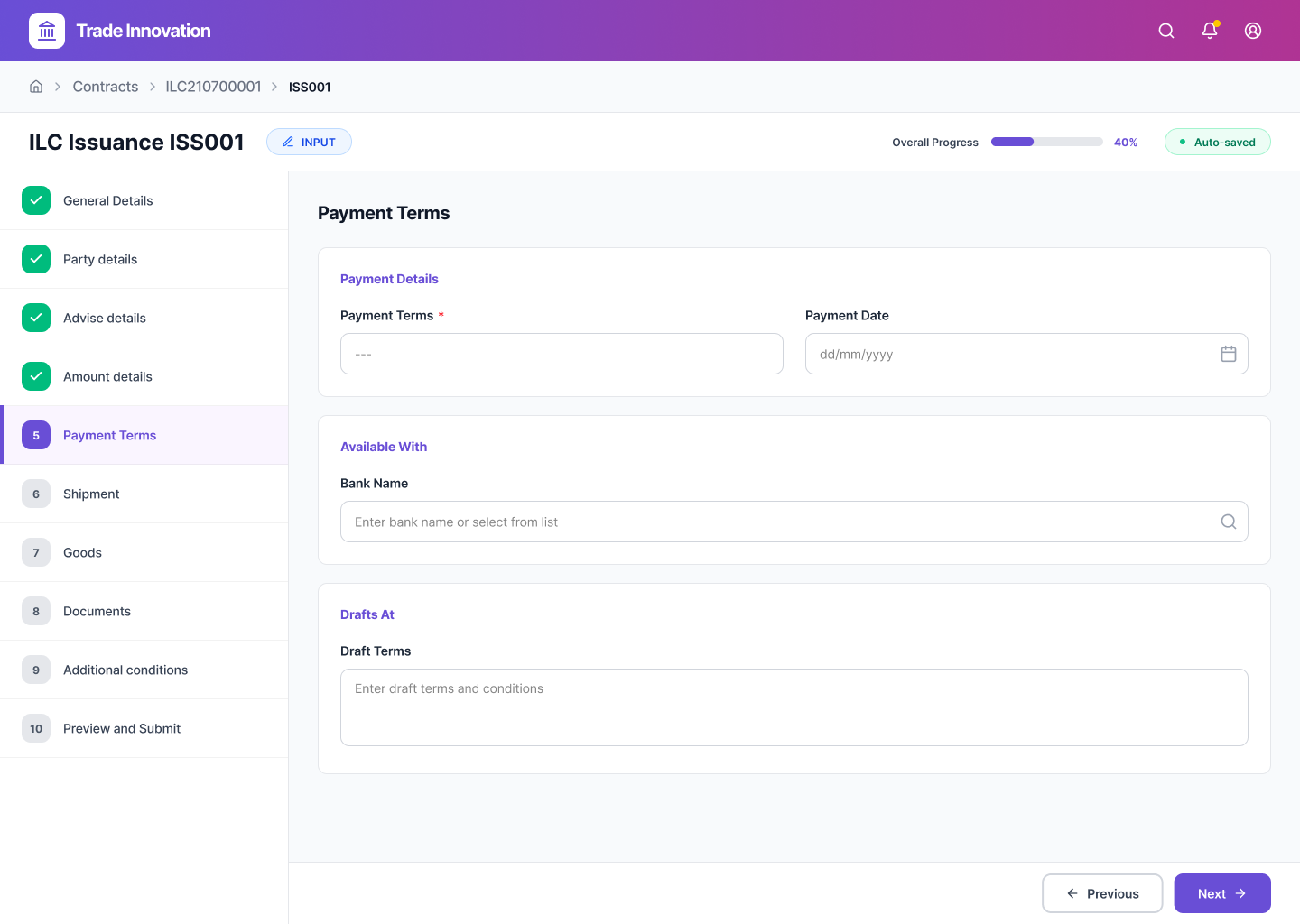
Reducing Cognitive Load via Progressive Disclosure
I replaced the legacy 'Monolithic Layout' with a context-aware stepper. By isolating complex financial inputs into focused views, we reduced decision fatigue and improved data entry speed by 20%.
B. COMPLIANCE ASSURANCE
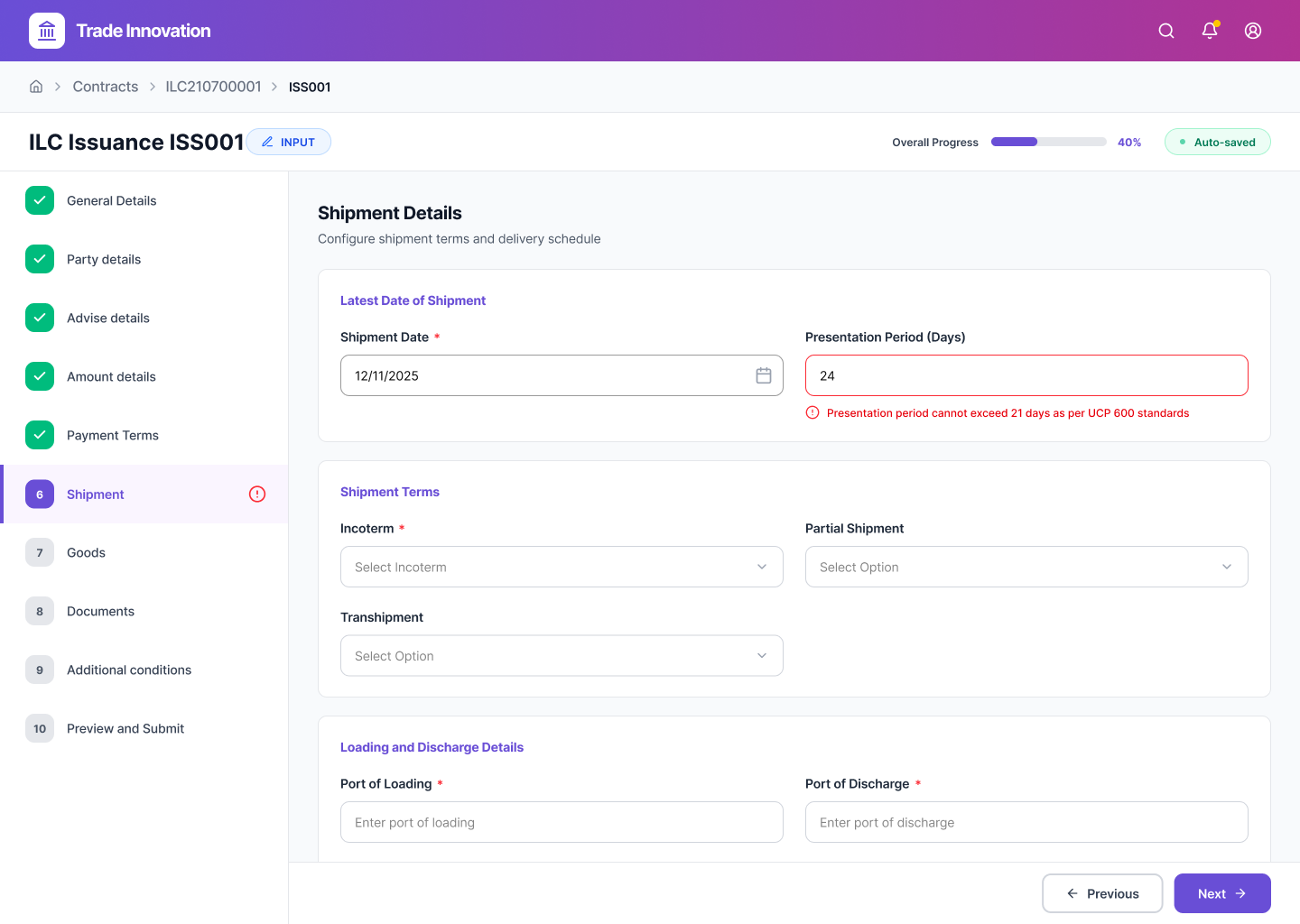
Inline SWIFT Compliance Validation
Eliminated the latency of post-submission errors. The system now cross-references inputs against SWIFT standards in real-time, acting as a proactive guardrail that allows officers to self-correct immediately without breaking their operational flow.
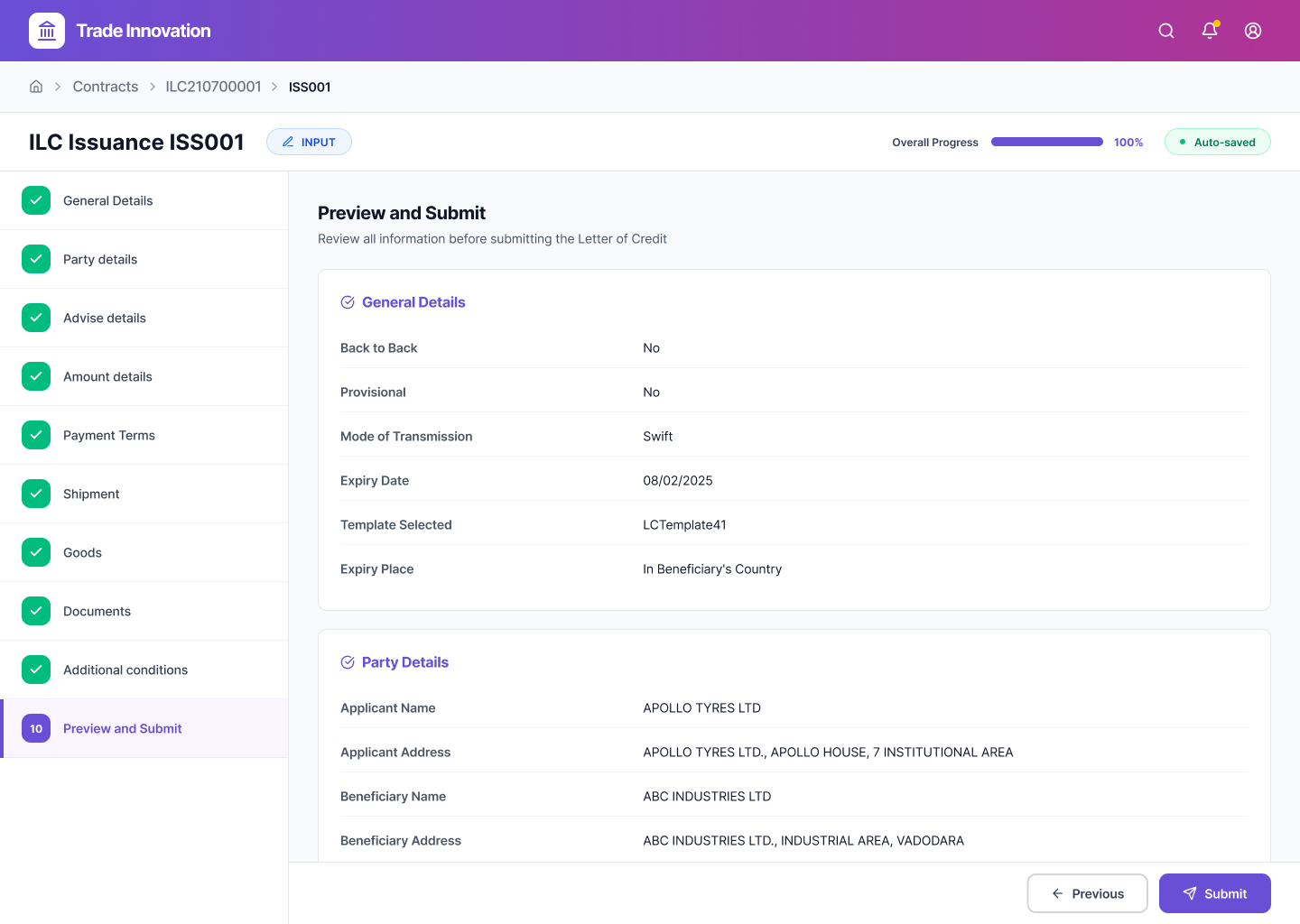
C. PRE-COMMIT VERIFICATION
Pre-Commit Verification Gate
To prevent costly amendments, I introduced a mandatory 'Summary Gate.' This allows officers to verify critical data points (like Expiry Dates & Amounts) in a read-only format before committing the transaction to the ledger.
D. TRANSACTION CERTAINTY
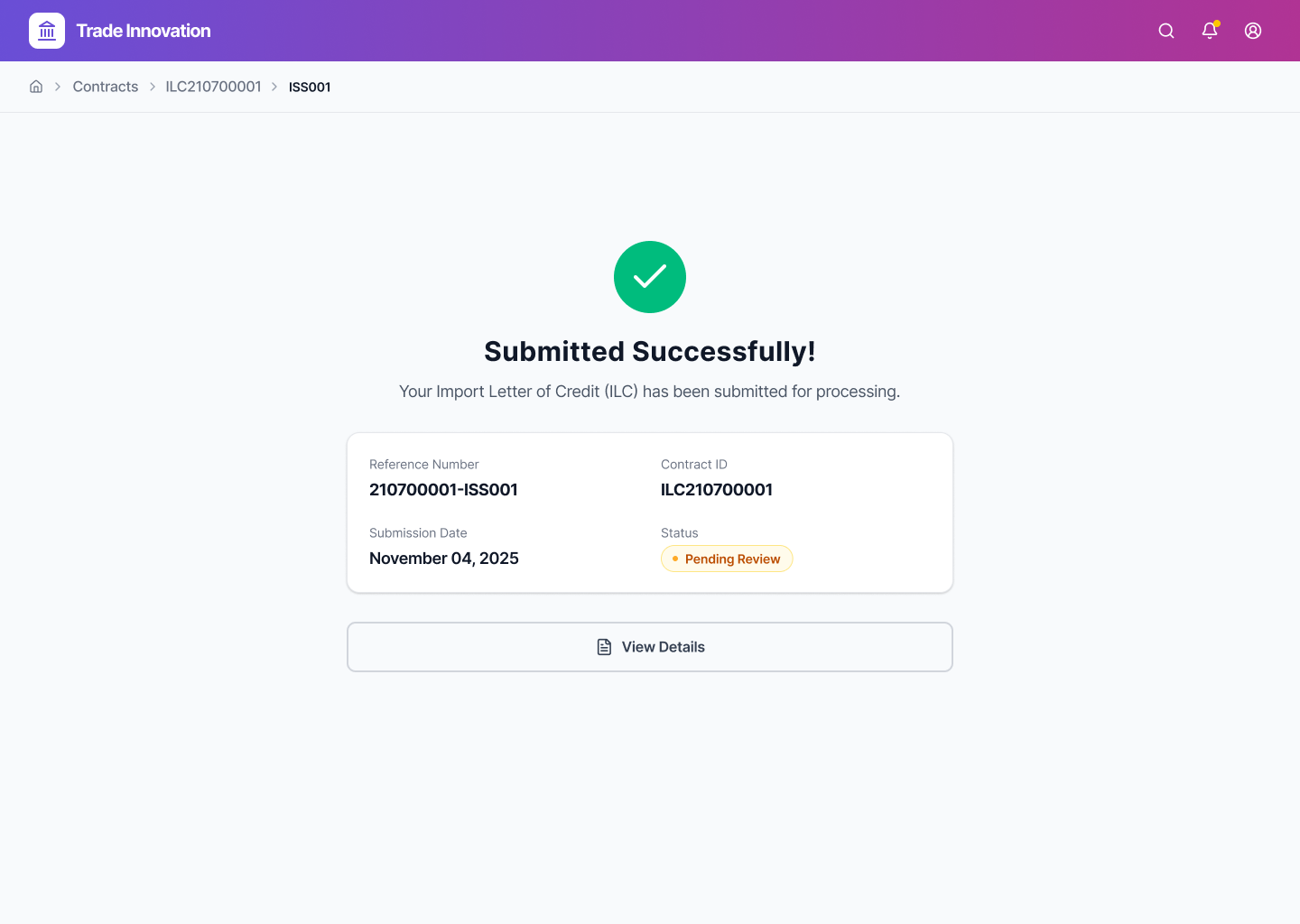
Transaction Certainty & Audit Trail
Beyond a generic success message, the confirmation screen provides the Transaction Reference Number (TRN) and explicit status visibility (e.g., 'Pending Review'). This ensures immediate traceability for the audit trail.
Measuring Impact
Operational Velocity
30% Reduction in TAT
Drastically reduced Turn-Around Time (TAT) for LC issuance by eliminating manual redundancies and streamlining the input flow.
Risk Mitigation
Zero SWIFT Rejections
Implementation of Real-Time Validation reduced syntax errors to near-zero, ensuring 100% compliance with UCP 600 standards.
Adoption & Training
Minimal Training Required
The intuitive, guided stepper model allowed junior officers to complete complex transactions without requiring the usual 2-week training period.
Business Goal
Increased STP Rate
The structured data input led to a significant increase in Straight-Through Processing (STP), reducing the need for manual backend intervention.
Retrospective
"Redesigning for Trade Finance taught me that complexity requires subtraction. The goal wasn't just to make the UI 'modern,' but to aggressively reduce cognitive load for high-stakes decisions."
"By collaborating early with Risk & Compliance teams, I was able to turn strict constraints (like SWIFT rules) into protective features—proving that in Fintech, good design is the ultimate risk mitigation strategy."